
Learn how to use MoneyPak without an account or logging in to load cards and send money at your-moneypak.com/guest-deposit
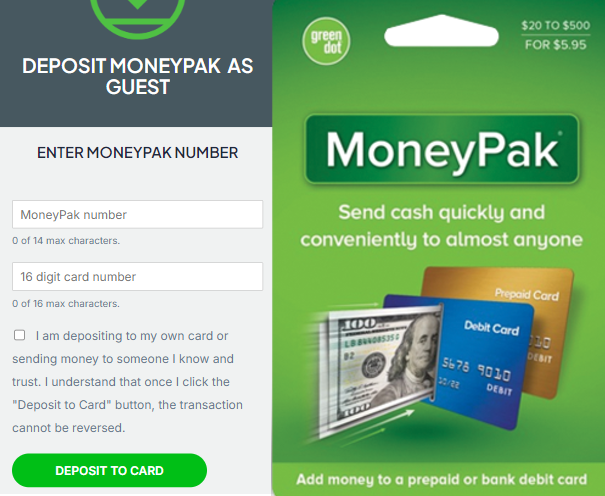
The MoneyPak is the convenient way to load prepaid or bank debit cards with cash quickly. Learn more about the benefits and how to use a MoneyPak without an account below.
Load MoneyPak funds to cards without an account easily at your-moneypak.com by following the simple steps below.
- Simply have your MoneyPak ready, then visit your-moneypak.com.
- At the top of the page, hover over "Login", and a drop down menu will appear. Click on the, "Guest Deposit" option.
- Enter your MoneyPak number, located on the back of the package.
- Next, enter your debit card number.
- Now click "Deposit" and your cash will be available shortly once the deposit is complete.
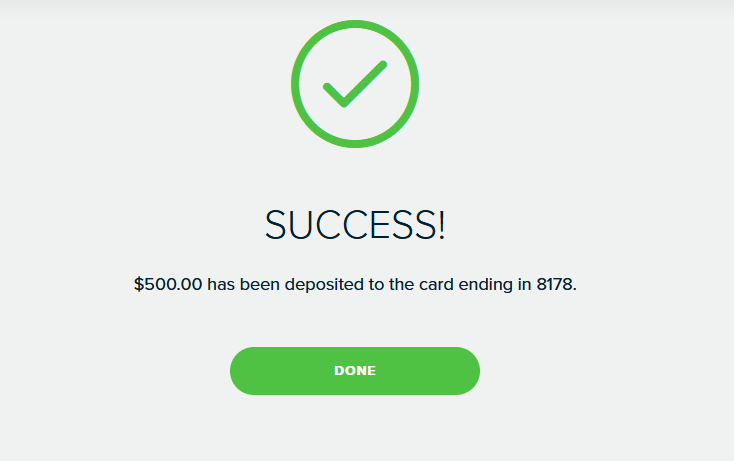
Watch the video on How to use MoneyPak without an account.
MoneyPak Customer Service
Phone Number: 1 (888) 971-7004
Website: your-moneypak.com
Login Problems
I’m having trouble creating a second MoneyPak secure login.
I forgot my login/password information
Secure login help
What is a secure login?
What is required to create a secure login?
To create a secure login, you must provide certain identification information, such as your name, Social Security Number, birth date, residential street address, email address, and mobile phone number. During registration, you must also verify your mobile phone number and allow Green Dot to send you text messages and collect information from your mobile device about your current location. You must also create a password. Keep your password safe to prevent others from logging into your account.
Additionally, some users may be asked to upload a photo ID so that we can verify their identity.
Can I create more than one secure login?
How does mobile phone number verification work?
How do I upload identification?
To keep your funds safe and help prevent fraud, we may require you to provide additional identity information and documents before you can use a MoneyPak. In those instances, you may be asked to upload a photo ID.
To upload your photo ID, please do the following:
- Using your mobile device in a well-lit area, take a clear photo of the front and back of your government-issued identification. Be sure to check that all four corners are in the frame.
- If you’re accessing your-moneypak.com with a mobile device, when prompted, select the identification photos from your photo album and upload them to the site. If you’re accessing your-moneypak.com
- with a computer browser, then you will need to email the photo ID pictures to yourself, then select the photo files and upload them. The upload may take a few seconds.
- Follow the website instructions and proceed until it says your photo ID was successfully submitted. If the image is unclear, review Step 1 and try again.
We usually complete the review within half an hour, but If your ID requires additional review it can take up to two business days.
If your ID qualifies for approval, we will send you a confirmation email. You may then come back to your-moneypak.com and enter the MoneyPak number again to deposit the funds to your card. If your ID is not readable, we will send you an email with instructions to come back and upload new images of your ID. If your ID does not qualify for approval, we will send you an email with instructions to request a refund.
I already created my MoneyPak secure login. What next?
I forgot my login/password information

MoneyPak by Green Dot Official Website - Deposit Money to Any Cards
Add money to any prepaid or bank debit card conveniently and quickly. For a $5.95 flat fee you can add $20 - $500 in cash at 70,000+ retailers nationwide.
Key phrases:
How to use MoneyPak
How to activate MoneyPak
How to deposit MoneyPak
How to add cash to card with MoneyPak
How to load MoneyPak
How to deposit money to card with MoneyPak
How to add money to card with MoneyPak
How to fund card with MoneyPak
How to Reload Debit Card with MoneyPak
How to Load Debit Card with MoneyPak
How to transfer MoneyPak to a Debit Card
How to Transfer Money from MoneyPak to a Debit Card
How to Deposit funds from MoneyPak to Debit Card
HashTags:
#moneypak #greendot #greendotcard #cashapp #paypal #deposit #reload #load #cash #money #funds #credit #debit #cards #walmartmoneycard #netspend #walmart #kroger #cvs #riteaid #walgreens #famillydollar #dollargeneral #7eleven #finance #personalfinance #banking #sendcash #sendmoney #fyp #fypシ #fypシ゚viral #trending #trend #virał #virelvideo #howto #finance #sendmoney #moneytransfer #debitcard #prepaid #bank #customerservice #prepaid #prepaidcard #bankcard #debitcard #giftcard #giftcards
Keywords:
how to use moneypak without an account, how to load moneypak without an account, how to deposit moneypak without an account, how to transfer moneypak funds without an account, how to load card without moneypak account, can't login to moneypak, can't log into moneypak, moneypak without account, moneypak without registering, moneypak id verification, moneypak id verification failed, moneypak login bypass, how to add moneypak to card without an account,